
Obliquo Reality Desktop
Reality capture · Windows
Measure and analyse your scans on your own PC.
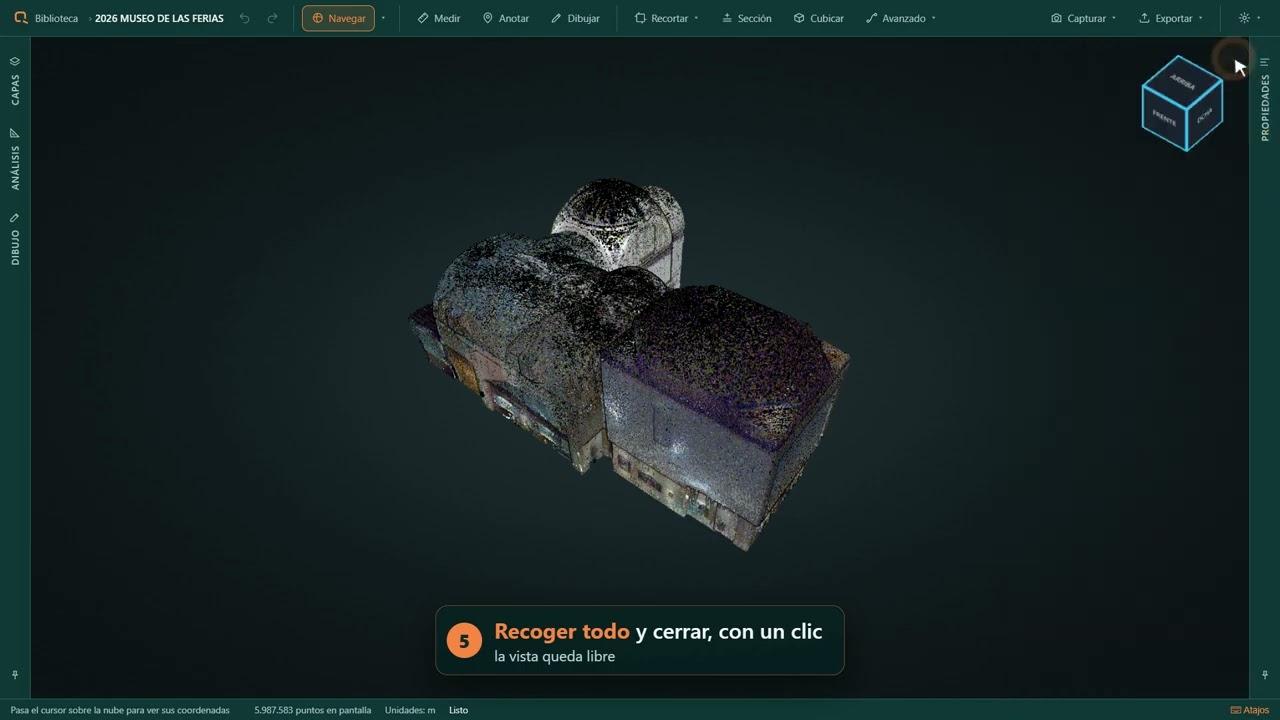
Open your scans, take measurements and turn them into drawings and reports. Work with point clouds, 360° panoramas and Gaussian Splatting, with local processing on your own computer.
Free edition · 14-day full-feature trial
- Local project processing
- Windows 10 / 11
- E57 · LAS / LAZ · COPC
See the tools at work
From opening a scan to documenting it.
Six short demonstrations recorded in Obliquo Reality Desktop. The application shown in these videos is in Spanish.
Drop a scan into your project
Start an import by dragging a file. Processing continues in the background.
Watch on YouTubeProfessional
Walk through the captured space
Explore at eye level with collision-aware navigation.
Watch on YouTubePlay loads the YouTube player. You can also watch directly on YouTube.
All Desktop tutorialsA complete working process
Take the scan through to a deliverable.
Open and explore
Bring E57 scans and their panoramas into the same project. View COPC without conversion and organise your source files.
E57 · LAS · LAZ · COPC · PLY · XYZ · PTS · TXT
Measure and draw
Measure distances, areas and volumes. Cut sections, add annotations and prepare your work for CAD.
Measurements · Sections · DXF · CSV
Check what has changed
With Professional, compare survey campaigns or a cloud against an IFC model. Inspect deviations, route interferences and terrain.
Comparison · BIM · Terrain · Interferences
Deliver usable results
Export point clouds, drawings and analysis reports. Keep projects in self-contained folders and prepare panoramas for Obliquo Cloud.
LAS / LAZ · DXF · GeoTIFF · PDF
Built around your work
A tool for the people behind the scan.
Surveying
Measure stockpiles, generate terrain and contours, georeference with control points and deliver to CAD or GIS.
Engineering and construction
Check captured reality against the design, compare campaigns and document clearances and deviations.
Scanning teams
Inspect an E57 with its panoramas, clean the point cloud and prepare a project for your client.
Choose your edition
Start free. Add the tools your work needs.
Try all features for 14 days, once per computer. Paid licenses are annual subscriptions for businesses and professionals.
Free
€0
Open scans and take basic measurements.
- Up to 20 million points per project
- Navigation, point, distance and height measurements
- No watermark
Basic
€299.99
per year + VAT
Measure, annotate and export your projects.
- Conversion with no point limit; multiple files per project
- Angle, area, profile, volume, Cubicar and Section tools
- Create and export annotations
- Overlay a cloud and its panoramas
- Export LAS / LAZ and panoramas for Obliquo Cloud
Professional
Full technical toolkit
€499.99
per year + VAT
Everything in Basic, plus advanced analysis and modelling tools.
- Compare and align clouds; compare with 3D models
- BIM / 3D models, DXF plans and vector layers
- Gaussian Splatting, collision navigation and voxels
- Georeferencing, terrain, route interferences and cross sections
- Classification, descriptors, cleaning and cable digitisation
- Section vectorisation and MCP server
Compare the included tools
| Tool or feature | Basic | Professional |
|---|---|---|
| Conversion with no point limit | Included | Included |
| Multiple files per project | Included | Included |
| Advanced measurements, Cubicar and Section | Included | Included |
| Create and export annotations | Included | Included |
| Cloud and panorama overlay | Included | Included |
| LAS / LAZ export | Included | Included |
| Panorama export to Obliquo Cloud | Included | Included |
| Cloud alignment and comparison with clouds or 3D models | Not included | Included |
| Classification, descriptors and cleaning | Not included | Included |
| Cable digitisation | Not included | Included |
| Georeferencing with control points | Not included | Included |
| Route interferences and cross sections | Not included | Included |
| 3D / IFC models and vector layers | Not included | Included |
| Gaussian Splatting | Not included | Included |
| Collision navigation and voxel view | Not included | Included |
| Surveying tools and section vectorisation | Not included | Included |
| MCP server | Not included | Included |
Purchase and activate a paid license from the application. One computer at a time; transfer it by deactivating it on the previous computer. Annual subscriptions renew automatically. Read the terms of sale.
Need licenses for a class or training course? Contact Voxel 3D.
Obliquo Reality
One product family, two versions: Desktop and Cloud.
Obliquo Reality Desktop
Process, measure and analyse scans on your Windows PC. Work with projects and their data locally.
Obliquo Reality Cloud
Publish and share projects for clients and teams to explore in their browser.
Explore Reality CloudBefore you get started
Can I work without an internet connection?
Project processing runs on your computer. The standard license needs internet access for activation and revalidation, and allows up to seven days without a connection. Contact Voxel 3D about offline activation for isolated computers.
What computer do I need?
64-bit Windows 10 or 11, a four-core 64-bit processor, 8 GB RAM and WebGL 2 compatible graphics. Allow 1 GB for the application, plus project storage. We recommend 16 GB RAM and dedicated graphics for larger datasets and Gaussian Splatting. Use the trial to check performance on your own computer.
What is the difference between Free and the trial?
Free has no watermark and supports up to 20 million points per project, with basic navigation and measurements. The trial unlocks all features for 14 days, once per computer.
Do I have to upload my project?
No. Point clouds and project files are processed locally. Publishing content to Obliquo Cloud is a separate workflow. If you connect an external AI assistant, review what information you choose to share with that service.
Which languages does the application support?
Spanish, English, Italian, French and Portuguese.
Can I move my license to a different computer?
Yes. Deactivate it on the first computer, then activate it on the new computer with your license code. Each license can be used on one computer at a time.
Download Obliquo Reality Desktop
Start with a project you know.
Download the installer for 64-bit Windows. Start with the free edition or try all features for 14 days.
Download Windows installerLatest stable release · 64-bit Windows 10 / 11 · .exe installer. This link is updated with each new stable release.